Capture the action
Preparing a dish, serving a customer, packing an order or checking a repair. Choose a specific moment with a clear gesture and a visible purpose.
 Design
What is in place, what needs improving, and what still needs a closer look. Each status refers only to the criterion below; it is not approval of the whole section.
People, context, texture, lighting, crop and duotone are documented in the page, JSON, full guide and image briefing.
View photography direction ↗A labeled AI scene demonstrates framing and treatments; filters run in the browser and the source PNG remains unchanged.
View photography direction ↗Add authorized images of real people, workplaces and cases. Review the pilot treatment direction in actual campaigns. The synthetic example is not documentary evidence.
Image direction / Photography
Editorial photography of professionals in action: serving, preparing, repairing and making decisions. Show the person, the gesture and the workplace with energy, proximity and the business’s own colors.
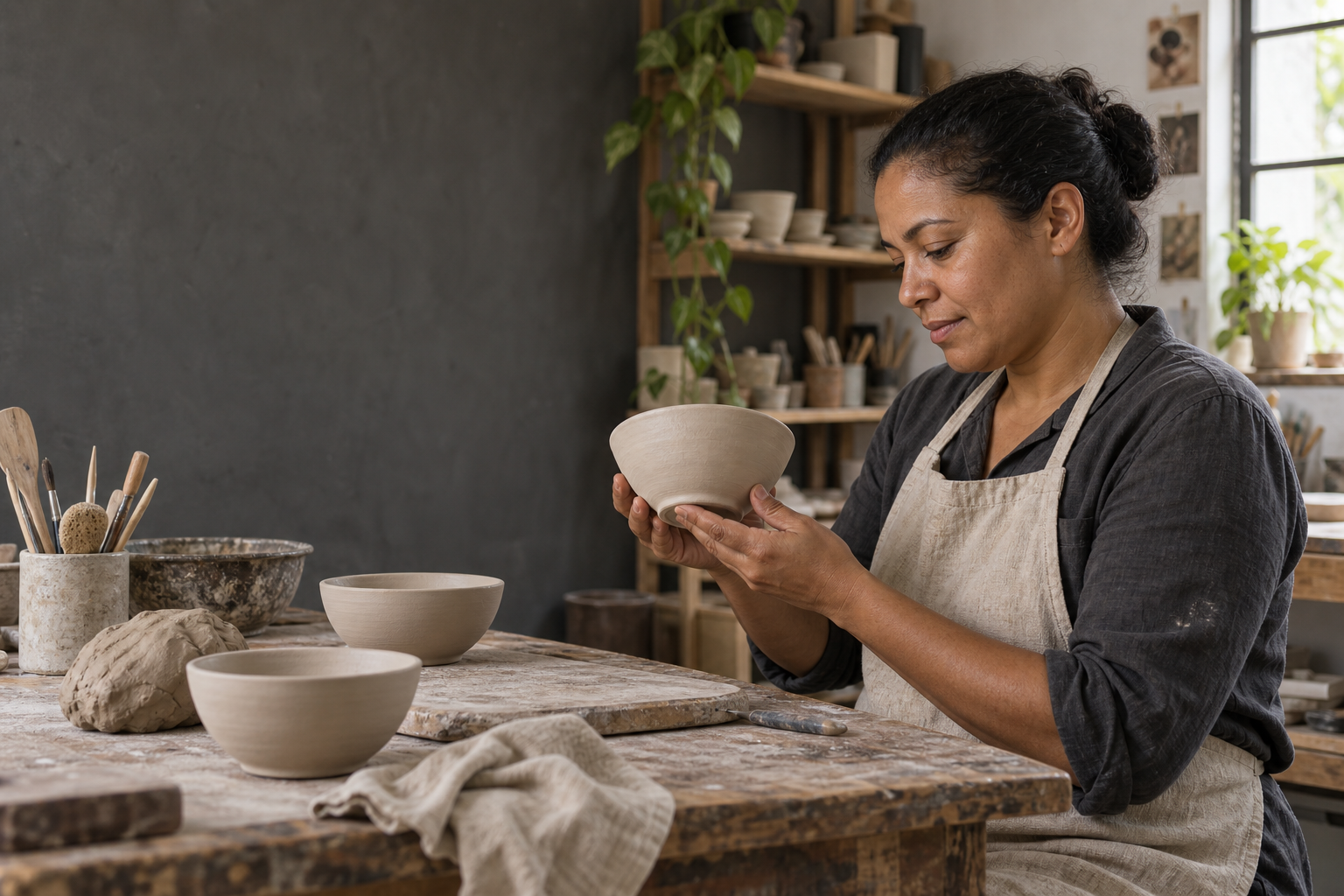
Preparing a dish, serving a customer, packing an order or checking a repair. Choose a specific moment with a clear gesture and a visible purpose.
Use eye-level, medium and close views that connect people, hands, tools and customers. Let the workplace give context; a camera-facing portrait is not the default.
Keep the colors of clothing, food, products and interiors. Use believable ambient light or controlled flash, with clear contrast and texture. The setting does not need to match the brand palette.
Use photographic detail, real-world proportions and believable optics. Exclude drawings, painting, vector art, collage, 3D renders and stylized skin. If generated with AI, keep the photographic appearance and identify its synthetic origin.
Build a sequence: show who does the work, where it happens and what makes it specific. The crops below come from the same demonstration image.
Show a recognizable task, attentive expressions and natural relationships. Preserve faces, hands and tools; technology takes part without becoming a spectacle.
Include enough of the setting to understand the work. Order does not require erasing signs of use. Avoid generic offices that could belong to any brand.
Explore paper, wood, fabric, metal and real business surfaces. Choose details that explain the process. A close-up unrelated to the story becomes decoration.
Use ambient light or controlled flash consistent with the setting. Keep skin and materials recognizable, with clear contrast and shadow detail. Avoid blown highlights and exaggerated cinematic grading.
Adjust exposure and white balance before stylizing. Preserve skin tones and product colors. Lime may appear in a real detail without tinting the entire scene.
Keep texture and small imperfections. Avoid skin smoothing, sharpening halos and crushed shadows that hide the action.
Combine photos with compatible light and color temperature. Alternate wide shots, medium shots and details. A sequence should feel like one story.
Compare formats before choosing a photo. The face, gesture and tool must remain legible. Adjust the focal point for each layout; do not rely on an automatic center crop.
Position is relative to the crop’s excess space: 0% aligns left, 100% right. At 3:2, the full image fits and the control has no effect.
.sixam-photo-crop {
  display: block;
  width: 100%;
  height: auto;
  aspect-ratio: 4 / 5;
  object-fit: cover;
  object-position: 75% 50%;
}Compare the same framing. Duotone maps shadows and highlights to two palette colors; it is not a translucent green overlay. Use it as an occasional editorial treatment without losing detail.
Default for people, products, testimonials and case studies. Preserves color information that helps people recognize the work.
<img src="/assets/design/6am/photography/ceramics-workshop-ai.png" width="1536" height="1024" alt="AI-generated scene of an artisan inspecting a ceramic bowl in a naturally lit workshop." style="display:block;width:100%;height:auto;">
<!-- AI-generated demonstration scene. It does not depict a real 6am client, team member or project. -->Use a sharp image with clear shapes. Preserve the original and correct exposure and white balance before applying a treatment.
Convert to grayscale and apply a gradient map: 6am ink in shadows and lime in highlights. Use the recipe’s HEX values without substituting approximate colors.
Check faces, hands, tools and texture. If the treatment flattens the scene or removes important information, return to natural color.
Apply text and logo on separate layers. Check the crop at its final size and keep the original, treated version and origin record.
Natural photography leads this example. Text occupies a separate solid strip, away from the face and gesture. The logo uses its official dark-surface asset. On mobile, the composition stacks without cropping content.
AI-generated demonstration scene. It does not depict a real 6am client, team member or project.
A gradual fade creates a quiet space for the message while keeping the professional and their work in view. Choose a light or dark composition to see the matching logo.
Left to right · opacity
This photo composition extends the opaque area to 36% and fades out at 65%. It is a separate layout recipe from the basic overlay tokens.
01Keep the message and logo within the opaque area. The transition starts after the reading area, away from the face.
02Fade the overlay to transparency; preserve natural skin tones, hands and the object being made. This is a local overlay, not a duotone treatment.
03Keep the original logo proportions and a clear margin around it. Use the white-lettering asset on ink and the dark-lettering asset on white.
04On narrow layouts, put the message on a solid surface below the photo. Review the crop and contrast again when changing the image.
Below 640 px of available width, the message moves below the photograph.
<style>
.sixam-photo-composition { container-type: inline-size; }
.sixam-photo-scene { position: relative; aspect-ratio: 16/10; background: #0A0C00; color: #FFFFFF; overflow: hidden; }
.sixam-photo-composition .sixam-photo-scene > img { display: block; position: absolute; width: 100%; height: 100%; object-fit: cover; object-position: 75% 50%; }
.sixam-photo-fade { position: absolute; inset: 0; background: linear-gradient(90deg, #0A0C00 0%, #0A0C00 36%, rgba(10, 12, 0, 0) 65%); }
.sixam-photo-message { position: absolute; left: 6%; width: 28%; top: 10%; bottom: 10%; display: flex; flex-direction: column; align-items: flex-start; justify-content: space-between; gap: 24px; }
.sixam-photo-message h2 { margin: 0; white-space: pre-line; font: 800 clamp(32px, 5cqw, 64px)/1.05 var(--6am-font-display, sans-serif); }
.sixam-photo-message p { margin: 16px 0 0; font: 16px/1.5 sans-serif; }
.sixam-photo-message img { width: 120px; height: auto; }
@container (max-width: 640px) {
  .sixam-photo-scene { aspect-ratio: auto; }
  .sixam-photo-composition .sixam-photo-scene > img { position: relative; aspect-ratio: 3/2; height: auto; }
  .sixam-photo-fade { bottom: auto; width: 100%; aspect-ratio: 3/2; }
  .sixam-photo-message { position: relative; inset: auto; width: auto; padding: 32px; }
}
</style>
<figure class="sixam-photo-composition">
  <div class="sixam-photo-scene">
    <img src="/assets/design/6am/photography/ceramics-workshop-ai.png" alt="AI-generated scene of an artisan inspecting a ceramic bowl in a naturally lit workshop." width="1536" height="1024">
    <div class="sixam-photo-fade" aria-hidden="true"></div>
    <div class="sixam-photo-message">
      <div><h2>Good work.
In focus.</h2><p>Space for the people behind every good idea.</p></div>
      <img src="/assets/img/logo/logo-6am-white.svg" width="120" height="24" alt="6am">
    </div>
  </div>
  <figcaption>AI-generated demonstration scene. It does not depict a real 6am client, team member or project.</figcaption>
</figure>Case studies, team portraits, premises and testimonials use real, authorized records. A generated scene must not be presented as a real client, employee or result.
AI-generated images may use photographic language for fictional editorial scenes. Identify their synthetic origin whenever they could be read as a real record. Illustration styles belong to the separate Illustration section.
When editing a documentary photograph, preserve people, products and context. Changes that alter the story are no longer a faithful record and need a different classification.
Take the guide to a photo shoot or an AI brief. The demonstration file and recipes can be accessed directly; treatments leave the original unchanged.
Pilot direction. The synthetic example demonstrates the visual language; an owned documentary photo library and treatment approval still need curation.